For Australian electrotechnology students
Wire it. Energise it. See exactly where it stops.
SparkEd is a set of learning tools for electrical apprentices, TAFE students and capstone candidates. Start with the Circuit Simulator: draw a motor control circuit, press the buttons and watch contactors pull in, lamps light and timers count down.
Free to use. No account needed.
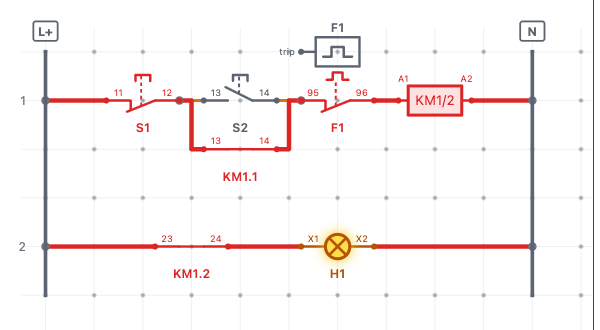
Made for learning control circuits
Correct symbols
IEC 60617 symbols, checked against AS/NZS 1102, with Australian workbook conventions such as KM1/2 coil labels and KM1.1 contacts.
A simulator that doesn't hold your hand
The wiring tool joins any two terminals, just like a real board. Press Simulate to find out if your circuit works and where the path breaks.
Real control logic
Latching, interlocks, on-delay and off-delay timers and overload trips behave the way they do on the job, so stop-start, forward-reverse and star-delta circuits make sense.
Seven tools, one suite
The Circuit Simulator is available now. The rest of the suite is on the way, in this order.
-
Available now · free tier
Circuit Simulator
Build and simulate control and power circuits. Save your work and export it as an image or file.
Launch Simulator -
Coming soon
Cable Selector
Work out cable size from load, length, installation method and grouping.
-
Coming soon
Formulas & Calculators
Ohm's law, power, voltage drop, fault-loop impedance and maximum demand, with the working shown.
-
Coming soon
Phasor Diagram Tool
See leading and lagging current, power factor and three-phase relationships.
-
Coming soon
Capstone Exam Prep
Practice questions and timed mock exams for your capstone assessment.
-
Coming soon
Fault Finding Trainer
Track down simulated faults, from simple open circuits to tricky intermittent ones.
-
Planned
Wiring Rules Reference
Planned, subject to a Standards Australia licence. Not available until that licence is in place.
Preview · coming soon
Capstone Exam Prep
The capstone is the last big hurdle before your licence. Capstone Exam Prep is being built to help you walk in ready:
- Practice questions by topic
- Timed mock exams
- An explanation for every answer
- Tracking of your weak areas so you know what to revise
Included in the suite subscription when it launches.
Two time-savers in the Circuit Simulator
With the suite subscription you can bring circuits in without drawing them from scratch. You always check the result before you simulate it.
Import a hand-drawn circuit
Photograph a legible ladder diagram from your workbook and turn it into an editable circuit.
Describe a circuit in words
Write a clear technical description, such as “when S2 is pressed, KM1 energises and holds in through KM1.1”, and get the circuit on your canvas.
Start building now
The free tier includes the seven core components: NO and NC contacts, start and stop push buttons, contactor coil, signal lamp and single-phase motor.
Launch Simulator